Which favicon sizes do you need in 2026? The ideal set
The ideal favicon set in 2026 is a multi-size favicon.ico (16, 32, 48 px), an SVG, a 180x180 Apple touch icon and 192/512 px PWA icons. This guide gives you the full size table, copy-paste HTML and a manifest.json.
 Tomáš Rohlena
12 min read
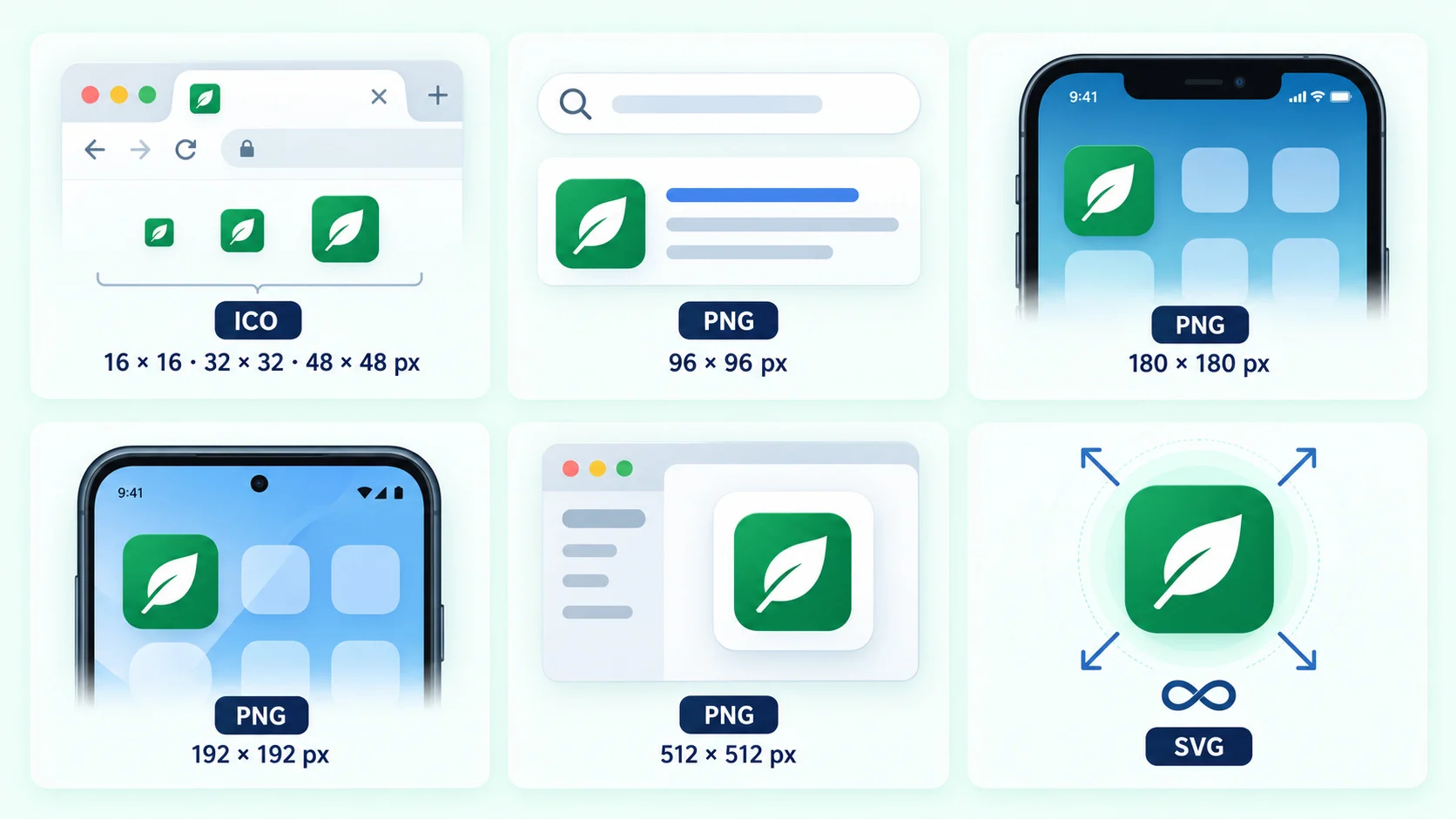
In 2026 the ideal favicon set is: a favicon.ico containing 16, 32 and 48 px images, a 96x96 PNG (for Google Search), an optional SVG favicon, a 180x180 apple-touch-icon.png, and 192x192 and 512x512 PNGs (plus a maskable 512) declared in a web app manifest. Windows tiles and legacy Apple sizes are only needed if you must support very old devices. Everything below explains why, with a size table, ready-to-use HTML and common mistakes to avoid.
The favicon landscape used to be messy: every browser and operating system asked for its own size, which produced the infamous 20-line <head> blocks. Today most of that is obsolete. Modern browsers scale one good icon, iOS wants one size, and Android reads the manifest. This article separates what is truly needed from what is merely nice to have.
The short answer: the ideal set of favicon files
- favicon.ico (16, 32, 48 px in one file) in the site root. Browsers, feed readers and many tools still request
/favicon.icoautomatically. - favicon.svg (optional but recommended) for crisp rendering at any size and dark mode support.
- PNG 16x16, 32x32 and 96x96 as explicit fallbacks. The 96 px version helps Google Search, which requires a multiple of 48 px.
- apple-touch-icon.png at 180x180, opaque, no transparency.
- 192x192 and 512x512 PNG in
manifest.json, plus a maskable 512x512 icon for Android. - theme-color meta tag for browser UI tinting on mobile.
- Windows tiles (70, 150, 310 px) with
browserconfig.xmlonly for legacy Windows and IE11 pinned sites.
Favicon sizes table: purpose, file names and priority
Use this table as a checklist. "Required" means a normal site will look broken or unfinished without it; "Recommended" means a clear quality gain; "Optional" means niche or legacy use.
| Size | Format | Typical file name | Purpose | Priority |
|---|---|---|---|---|
| 16, 32, 48 px | ICO (multi-image) | favicon.ico | Browser tabs, bookmarks, default /favicon.ico request, legacy clients |
Required |
| 16x16 | PNG | favicon-16x16.png | Standard tab icon on 1x screens | Optional (covered by ICO) |
| 32x32 | PNG | favicon-32x32.png | Tab icon on high-DPI screens, taskbar shortcuts | Recommended |
| 96x96 | PNG | favicon-96x96.png | Google Search results (multiple of 48 px), some desktop shortcuts | Recommended |
| Scalable | SVG | favicon.svg | Sharp icon at any size, dark mode via prefers-color-scheme |
Optional (recommended) |
| 180x180 | PNG | apple-touch-icon.png | iOS and iPadOS home screen, Safari favourites and share sheet | Required |
| 57, 60, 72, 76, 114, 120, 144, 152, 167 | PNG | apple-touch-icon-152x152.png etc. | Legacy iOS versions and old iPads | Optional (legacy) |
| 192x192 | PNG | web-app-manifest-192x192.png | Android home screen, Chrome install prompt | Required for PWA |
| 512x512 | PNG | web-app-manifest-512x512.png | PWA splash screen, store listings, install dialogs | Required for PWA |
| 512x512 (maskable) | PNG | maskable-512x512.png | Android adaptive icon shapes (circle, squircle) | Recommended for PWA |
| 70x70, 150x150, 310x150, 310x310 | PNG | mstile-150x150.png etc. | Windows Start menu tiles via browserconfig.xml | Optional (legacy) |
favicon.ico: 16, 32 and 48 px in one file
An ICO file is a container that holds several bitmaps. A good favicon.ico includes 16x16, 32x32 and 48x48 images so the browser or OS can choose the closest match. Place it at the root of your domain (https://example.com/favicon.ico). Even if your HTML points elsewhere, many crawlers, RSS readers and older browsers still request that exact URL, so having it avoids 404 noise in your logs.
Do not simply rename a PNG to .ico. Most browsers tolerate it, but some tools reject it and you lose the multi-resolution benefit. Export a real ICO.
PNG favicons: 16, 32 and 96 px
PNG links with explicit sizes let the browser pick the best bitmap without parsing the ICO. In practice 32x32 covers high-DPI tabs, and 16x16 is nearly redundant today. The 96x96 size is worth adding because Google Search displays favicons next to results and requires a square icon whose size is a multiple of 48 px (48x48, 96x96, 144x144 and so on). A 96 px file gives Google a sharper source than a 48 px one when it downsamples for mobile results.
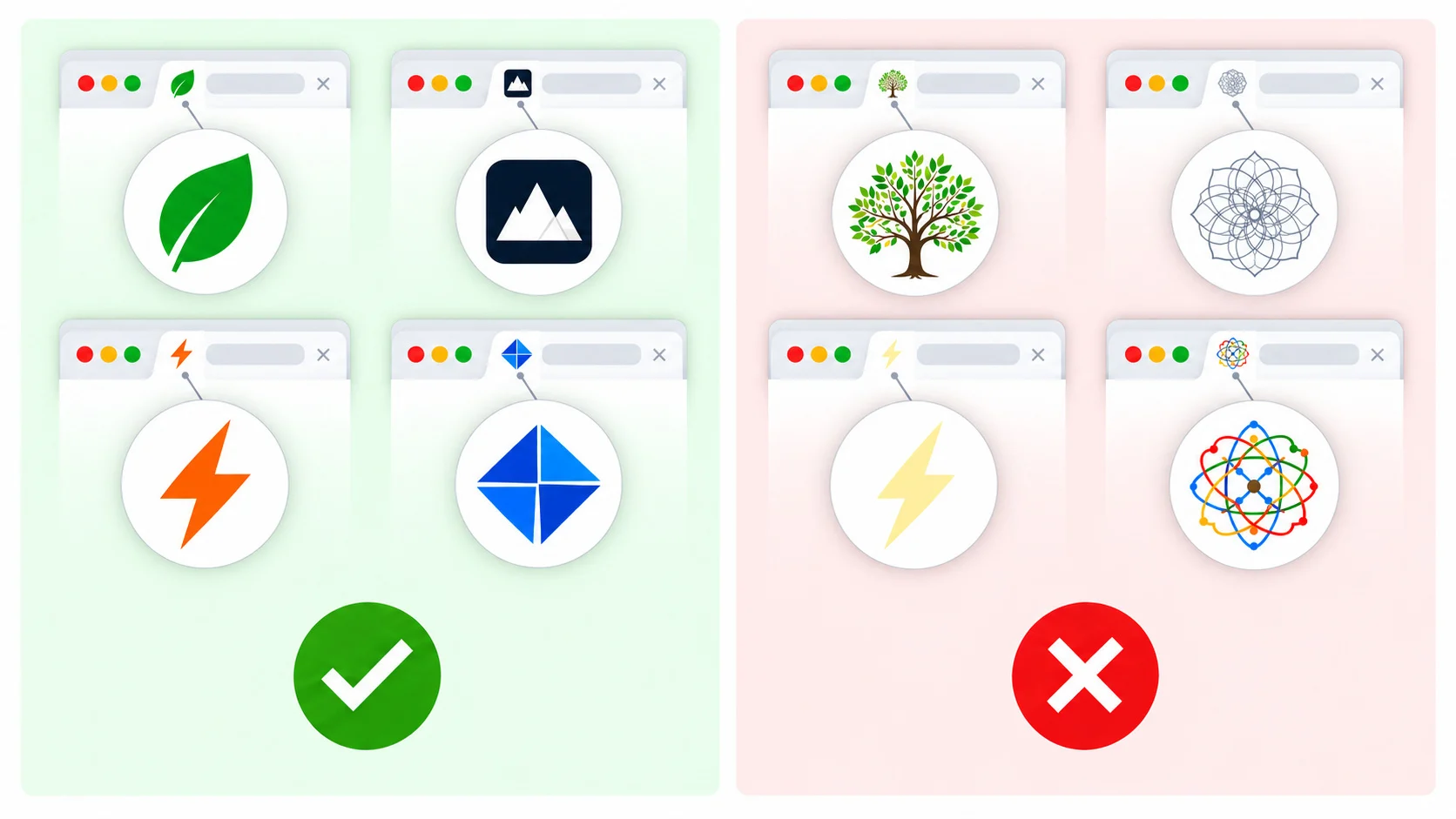
Design tip: at 16 px, fine detail disappears. Use a bold, simple shape, high contrast and little or no text. You can tweak and preview your icon in the MakeFav editor before exporting.
SVG favicon and dark mode
An SVG favicon is a single tiny file that stays sharp on any screen density. Chromium-based browsers and Firefox support it. Safari's support has historically been limited, so never rely on SVG alone: keep the ICO and PNG fallbacks.
The biggest advantage is theming. Because an SVG can contain CSS, you can adapt the icon to the user's colour scheme with prefers-color-scheme:
<svg xmlns="http://www.w3.org/2000/svg" viewBox="0 0 32 32">
  <style>
    .bg { fill: #0f172a; }
    .fg { fill: #ffffff; }
    @media (prefers-color-scheme: dark) {
      .bg { fill: #ffffff; }
      .fg { fill: #0f172a; }
    }
  </style>
  <rect class="bg" width="32" height="32" rx="6"/>
  <circle class="fg" cx="16" cy="16" r="8"/>
</svg>
Note that the media query reflects the browser or OS theme, which is what the tab bar uses. It does not follow a theme toggle on your own website.
One known quirk: when both an ICO and an SVG are listed, Chrome may pick the ICO. Declaring the ICO with sizes="32x32" and listing the SVG afterwards makes Chrome prefer the SVG, as shown in the code below.
Apple touch icon: 180x180 and the legacy sizes
When a user adds your site to the iOS or iPadOS home screen, Safari uses the apple-touch-icon. Today a single 180x180 px PNG is enough: iOS scales it down for older devices and iPads. Name it apple-touch-icon.png and put it in the root; iOS even looks for that file by default if no link tag exists.
Rules for the Apple icon:
- No transparency. iOS fills transparent pixels with black, so a transparent logo often turns into a black blob. Add a solid background colour.
- No rounded corners. iOS applies its own rounded mask. Supply a full square.
- Keep key content away from the very edges, since the corners are clipped.
When do you need the legacy sizes (57, 72, 76, 114, 120, 144, 152, 167)? Only if you support iOS 6 or earlier, or want per-device exact pixel control for iPad Pro (167 px) and iPad (152 px). For nearly every site in 2026, the 180x180 file alone is fine. The maximum-compatibility setup below includes a few for completeness.
Android and PWA icons: 192, 512 and maskable
Chrome on Android and other PWA-capable browsers read icons from the web app manifest, not from <link rel="icon">. For installability you need at least a 192x192 and a 512x512 PNG. The 192 px icon is used on the home screen and app launcher; the 512 px icon appears on splash screens and install dialogs.
Maskable icons and the safe zone
Android adaptive icons can be cropped into a circle, squircle or other shape depending on the device. A maskable icon is designed to be cropped safely: the important content must sit inside the safe zone, a centred circle with a diameter of 80% of the image (radius equals 40% of the side). For a 512x512 file, that means keeping your logo within a circle of about 410 px in diameter, and extending the background colour to all four edges so no gaps show after masking.
Declare the maskable icon as its own entry with "purpose": "maskable". Avoid "any maskable" on one file: the padding needed for masking looks too small when the icon is shown unmasked.
Example manifest.json
{
  "name": "Example App",
  "short_name": "Example",
  "start_url": "/",
  "display": "standalone",
  "background_color": "#ffffff",
  "theme_color": "#0f172a",
  "icons": [
    {
      "src": "/web-app-manifest-192x192.png",
      "sizes": "192x192",
      "type": "image/png",
      "purpose": "any"
    },
    {
      "src": "/web-app-manifest-512x512.png",
      "sizes": "512x512",
      "type": "image/png",
      "purpose": "any"
    },
    {
      "src": "/maskable-512x512.png",
      "sizes": "512x512",
      "type": "image/png",
      "purpose": "maskable"
    }
  ]
}
Serve the file as application/manifest+json (or application/json) and link it from every page with <link rel="manifest" href="/manifest.json">. Some projects name it site.webmanifest; the name does not matter, the link does.
Windows tiles and browserconfig.xml
Windows 8.1 and 10 let users pin a site to the Start menu, and IE11 and legacy Edge read tile images from browserconfig.xml. The usual sizes are 70x70 (small), 150x150 (medium), 310x150 (wide) and 310x310 (large). Chromium-based Edge uses the manifest and regular favicons instead, so this is a legacy feature. Include it only if your audience still includes older Windows setups, for example in corporate environments.
<?xml version="1.0" encoding="utf-8"?>
<browserconfig>
  <msapplication>
    <tile>
      <square70x70logo src="/mstile-70x70.png"/>
      <square150x150logo src="/mstile-150x150.png"/>
      <wide310x150logo src="/mstile-310x150.png"/>
      <square310x310logo src="/mstile-310x310.png"/>
      <TileColor>#0f172a</TileColor>
    </tile>
  </msapplication>
</browserconfig>
theme-color: tinting the browser UI
The theme-color meta tag tells mobile browsers (and some desktop ones) which colour to use for the address bar or title bar. It is not a favicon, but it belongs to the same branding set. You can supply separate values for light and dark mode:
<meta name="theme-color" content="#ffffff" media="(prefers-color-scheme: light)">
<meta name="theme-color" content="#0f172a" media="(prefers-color-scheme: dark)">
Minimal modern setup vs. maximum compatibility
Minimal modern setup (recommended for most sites)
Five files cover over 99% of real-world use: favicon.ico, favicon.svg, apple-touch-icon.png (180x180), and the two manifest icons (192 and 512). Add the 96x96 PNG if Google Search visibility matters, and a maskable icon if you ship a PWA.
<link rel="icon" href="/favicon.ico" sizes="32x32">
<link rel="icon" href="/favicon.svg" type="image/svg+xml">
<link rel="apple-touch-icon" href="/apple-touch-icon.png">
<link rel="manifest" href="/manifest.json">
Maximum compatibility setup
Choose this when you serve a broad or enterprise audience, or when you want every possible client covered. It adds explicit PNG sizes, legacy Apple sizes, Windows tiles and theme colours.
<head>
  <meta charset="utf-8">
  <meta name="viewport" content="width=device-width, initial-scale=1">

  <!-- Classic and modern browser icons -->
  <link rel="icon" href="/favicon.ico" sizes="32x32">
  <link rel="icon" href="/favicon.svg" type="image/svg+xml">
  <link rel="icon" type="image/png" sizes="16x16" href="/favicon-16x16.png">
  <link rel="icon" type="image/png" sizes="32x32" href="/favicon-32x32.png">
  <link rel="icon" type="image/png" sizes="96x96" href="/favicon-96x96.png">

  <!-- Apple -->
  <link rel="apple-touch-icon" sizes="180x180" href="/apple-touch-icon.png">
  <link rel="apple-touch-icon" sizes="167x167" href="/apple-touch-icon-167x167.png">
  <link rel="apple-touch-icon" sizes="152x152" href="/apple-touch-icon-152x152.png">
  <link rel="apple-touch-icon" sizes="120x120" href="/apple-touch-icon-120x120.png">

  <!-- Android / PWA -->
  <link rel="manifest" href="/manifest.json">
  <meta name="theme-color" content="#ffffff" media="(prefers-color-scheme: light)">
  <meta name="theme-color" content="#0f172a" media="(prefers-color-scheme: dark)">

  <!-- Windows (legacy) -->
  <meta name="msapplication-config" content="/browserconfig.xml">
  <meta name="msapplication-TileColor" content="#0f172a">

  <title>Example</title>
</head>
Note the root-relative paths starting with /. They work on every page depth, which brings us to the most common mistakes.
Common favicon mistakes and how to fix them
1. Wrong paths
A link like href="favicon.ico" resolves relative to the current URL, so it works on / but breaks on /blog/post/. Use root-relative (/favicon.ico) or absolute URLs. Also check that the files really exist: open each URL directly in the browser and make sure it returns HTTP 200, not a redirect to a 404 page or a login wall.
2. Missing or wrong sizes attribute
Without sizes, browsers must download icons to inspect them, and may pick the wrong one. Always declare sizes on PNG links and make sure it matches the real pixel dimensions. A file labelled 32x32 that is actually 64x64 causes inconsistent results.
3. Aggressive caching
Browsers cache favicons for a long time, often independently of the page cache. After a rebrand the old icon may linger for days. Change the file name or add a version query string (/favicon.ico?v=2) and update the link tags. Hard reloads often do not refresh the tab icon; opening the icon URL directly and reloading it usually does.
4. Non-square images
Favicons must be square. A rectangular logo gets stretched, cropped or letterboxed unpredictably. Design a dedicated square mark, such as an initial or symbol, rather than shrinking a wide wordmark.
5. Transparent Apple touch icons turning black
iOS fills transparency with black. Give the 180x180 icon an opaque background and do not pre-round the corners.
6. Maskable icons without a safe zone
If the logo touches the edges of a maskable icon, Android will cut it off. Keep it inside the central 80% circle and fill the full canvas with the background colour.
7. Blocking icons from crawlers
If robots.txt disallows your favicon path, Google cannot fetch it and will show a generic globe icon in search results. Also remember that Google needs the favicon on the same host as the page and refreshes it only occasionally, so changes may take days or weeks to appear.
8. Forgetting the manifest link or purposes
A manifest that is not linked, or that lacks 192 and 512 px icons, prevents the install prompt in Chrome. Validate it in your browser's developer tools under the Application tab.
Generate the whole set in one click
Creating a dozen files by hand in an image editor, then converting to ICO and writing the manifest, is tedious and error-prone. MakeFav generates all of the files above from a single image, text or emoji: multi-size favicon.ico, PNGs, SVG, Apple touch icon, 192/512 PNGs, a maskable icon, Windows tiles, manifest.json and browserconfig.xml, plus a ready-to-paste HTML snippet, all in one ZIP download. You can fine-tune background, padding and shape in the editor, verify an existing site with the favicon checker, and automate generation through the developer resources.
Deployment checklist
- Upload all files to the root of your site.
- Paste the HTML snippet into the
<head>of every page (or your shared layout). - Make sure paths are root-relative and return HTTP 200.
- Check light and dark mode, an iOS home-screen install and an Android install.
- Run the checker to catch missing or mismatched sizes.
- Bust caches with a version string if you replaced an old icon.
Frequently asked questions
Do I still need favicon.ico in 2026?
Yes. Although modern browsers accept PNG and SVG, many crawlers, feed readers, email clients and older browsers still request /favicon.ico directly. A multi-size ICO with 16, 32 and 48 px images is a small file that prevents missing icons and 404 errors.
What size should a favicon be for Google Search?
Google requires a square favicon whose size is a multiple of 48 px, at least 48x48. A 96x96 PNG is a safe choice, and an SVG is also supported. Google also needs the file to be crawlable, so do not block it in robots.txt. Updates can take days or weeks to show up.
Is 180x180 enough for the Apple touch icon?
For almost all sites, yes. iOS and iPadOS downscale a 180x180 PNG for every current device. The older sizes (57 to 152 px) matter only for very old iOS versions. Remember to use an opaque background so the icon does not turn black.
What is a maskable icon and do I need one?
A maskable icon is a 512x512 PNG designed for Android's adaptive icon shapes. Its important content sits inside an 80% diameter circle at the centre, and the background fills the whole square. You need it only if you offer an installable PWA, but it makes the icon look native instead of sitting in a white circle.
Why does my old favicon still show after I changed it?
Browsers cache favicons separately and for a long time. Rename the file or add a version query string such as ?v=2, update the link tags, and then open the icon URL directly and reload it. Search engines may take longer to refresh their own copy.
Related articles
Create your favicon in seconds
Free favicon generator with ICO, Apple, Android and PWA icons.
Open the generator